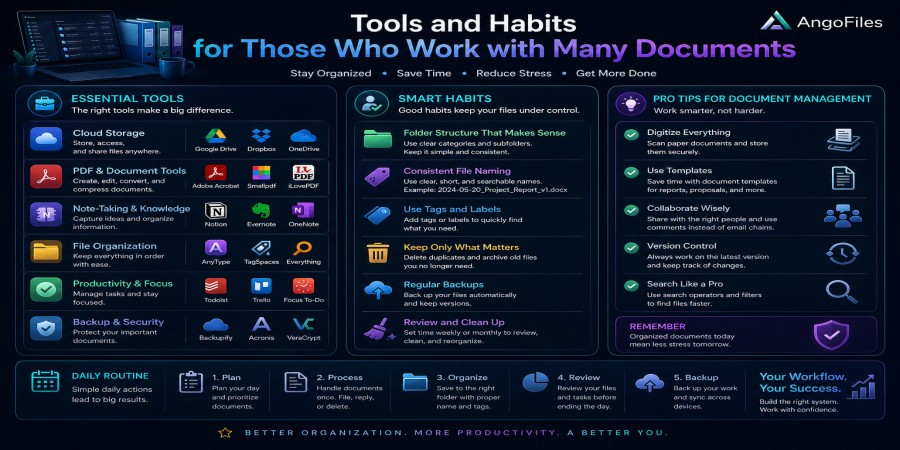
Tools and Habits for Those Who Work with Many Documents
Apr 25, 2026 03:03 PM
Leandro Neto
Tools and Habits for Those Who Work with Many Documents
Working with many documents is not just a matter of having enough storage space. It is a question of discipline, structure, and the right tools. When documents start piling up, the real challenge is no longer creating or receiving them. The challenge is finding them, updating them, sharing them, backing them up, and keeping them organized over time.
People who handle a large volume of documents every day often waste time not because they lack ability, but because their workflow is fragmented. Files are scattered across folders, devices, email inboxes, cloud accounts, and messaging apps. Versions get mixed up. Important files are forgotten. Simple tasks become slow and frustrating.
The solution is not to work harder. The solution is to build a system.
A good document workflow combines the right tools with the right habits. Together, they make it easier to stay organized, reduce mistakes, and work faster without losing control.
Why Document Management Becomes a Problem
The more documents you handle, the more likely it becomes that something will go wrong. A single file can be managed casually. Ten files can still be handled by memory. But once you reach dozens or hundreds of documents, memory stops being enough.
At that point, the usual problems begin:
- Files are saved in the wrong place
- Different versions become confusing
- Important documents are duplicated or lost
- Searching takes too much time
- Sharing becomes messy
- Backups are incomplete
This is why people who work with many documents need more than storage. They need systems that support clarity and consistency.
The Right Tools Make a Big Difference
The first part of a strong document workflow is choosing tools that simplify your life instead of complicating it. The best tools are not always the most advanced. They are the ones that help you stay in control.
1. Cloud storage
Cloud storage is one of the most important tools for document-heavy work. It keeps your files accessible from different devices and reduces dependence on a single computer or phone. That means fewer risks, less manual transfer, and faster access when you need something urgently.
A reliable cloud system also makes it easier to share files without sending repeated attachments or creating new copies every time.
2. File organization platforms
When you work with many documents, you need a place where everything can be structured clearly. Folder systems, tags, categories, and searchable archives all help reduce confusion.
The more documents you manage, the more important it becomes to separate them by purpose, project, date, or client. Without that structure, your file system becomes a pile instead of a system.
3. Document scanners and converters
Paper documents often become a problem when they are not digitized properly. A scanner or scanning app helps turn physical papers into searchable digital files. Converters are also useful when you need to move between formats such as PDF, Word, or image files.
This is especially important if your workflow includes contracts, receipts, forms, school materials, or records that need to be stored and retrieved later.
4. Search tools
If you work with many documents, search is not a luxury. It is essential. A strong search feature can save hours over time by letting you find files instantly instead of browsing folder after folder.
Good naming habits make search even more powerful. The better your tools and naming system are, the faster you can work.
5. Backup solutions
Documents are too important to leave unprotected. A backup tool protects your work from accidental deletion, device failure, and other unexpected problems. The best backup systems work quietly in the background so you do not have to remember everything manually.
A backup is not just insurance. It is part of a serious document workflow.
Habits That Keep Your Workflow Strong
Tools are important, but habits are what make the tools effective. Without good habits, even the best software becomes messy and inefficient.
1. Save files immediately in the right place
One of the most useful habits is to never leave a file “for later.” If a document belongs in a specific folder, put it there immediately. Waiting until later almost always leads to clutter and confusion.
The longer a file stays unsorted, the more likely it is to get lost in downloads, desktop folders, or random storage locations.
2. Use clear file names
A good file name should tell you what the document is without opening it. This becomes critical when you manage many files with similar content.
A strong naming style usually includes the subject, purpose, and date if needed. For example, a document named “Invoice_ClientName_2026” is far more useful than “final_version_3.”
Clear file names reduce search time and make your system easier to trust.
3. Separate active files from archived files
Not every document needs to stay in your main working folder. Active files are the ones you use right now. Archived files are the ones you may need later, but not every day.
This separation keeps your daily workspace clean. It also makes it easier to focus on current tasks without being distracted by old material.
4. Review your documents regularly
A document system should not be static. Files accumulate over time, and some of them become outdated. If you never review your system, clutter will slowly return.
Regular review helps you remove duplicates, archive old files, and keep your structure clean. This does not need to be complicated. A short weekly or monthly check can make a major difference.
5. Back up important files consistently
Many people say they value their documents, but their behavior does not show it. They keep important files in only one place and assume nothing will happen to them.
That is a risky habit. A better approach is to back up regularly and keep at least one additional copy in a separate location. Consistency matters more than size. A small but current backup is more useful than a large but outdated one.
6. Avoid mixing different types of documents
Work documents, personal records, school files, and project materials should not all live together in one folder. Mixing categories makes searching harder and increases the chance of mistakes.
When documents have different purposes, they should have different spaces. That keeps your workflow simpler and more professional.
7. Reduce duplicate copies
Duplicate files create confusion. People often create extra versions because they are afraid to overwrite something important, but too many copies make it harder to know which file is current.
A better habit is to have one clear master version and a controlled backup system. That way, you know which file to use and which copies exist for safety.
What a Good Document System Looks Like
A strong document workflow should be simple, predictable, and easy to maintain. It does not need to be complicated to be effective.
A practical structure may look like this:
- Main folders for work, study, and personal use
- Subfolders by project, subject, or client
- Clear naming rules for every file
- Regular backup routines
- One place to search for everything
- A clean archive for old documents
This kind of system works because it reduces decision-making. You do not waste time asking where a file should go. The structure already answers that for you.
Why Discipline Matters More Than Perfection
Many people try to build the “perfect” file system, but perfection is not the goal. The goal is consistency.
A simple system that you actually use is far better than a complex system that you abandon after a week. The best habits are the ones you can repeat without effort. The best tools are the ones that fit naturally into your daily routine.
The more documents you handle, the more valuable consistency becomes. Small habits repeated every day create a strong workflow over time.
How Better Habits Save Time and Reduce Stress
When your document workflow is clear, you save time in many ways:
- You find files faster
- You avoid repeating work
- You reduce mistakes
- You spend less time searching
- You feel more in control
That last point matters more than people realize. A messy document system creates mental pressure. A clean one creates confidence.
When you know where everything is, you work with less stress and more focus. That makes you faster, but also calmer and more effective.
Conclusion
People who work with many documents need more than storage. They need a system that combines the right tools with the right habits. Cloud storage, search tools, backup systems, and document management platforms all help, but only when supported by clear naming, regular organization, and consistent routines.
The real goal is not to own more tools. It is to reduce friction. When your documents are easy to find, easy to protect, and easy to manage, your entire workflow becomes better.
Good document management is not a one-time task. It is a daily habit that saves time, prevents mistakes, and keeps your digital life under control.
Work Smarter with AngoFiles
With AngoFiles, you can store, organize, and share many documents in a cleaner and more reliable way. Keep your files structured, access them quickly, and build a workflow that supports productivity instead of slowing it down.
Start using AngoFiles today and make document management simpler.
Login or create account to leave comments
Popular articles

Optimizing Digital Work: How Cloud Storage, File Sharing, an...
Dec 14, 2025 04:08 PM

Upload and Share Your Files with Ango Files
Dec 14, 2025 03:45 PM

Best Secure Cloud Storage for Business in 2026
Jan 17, 2026 11:19 AM

Best Free Cloud Storage Services in 2026
Apr 03, 2026 07:01 AM

How to Send Large Files Over the Internet for Free (Complete...
Mar 30, 2026 05:19 PM
Categories
Comments (0)