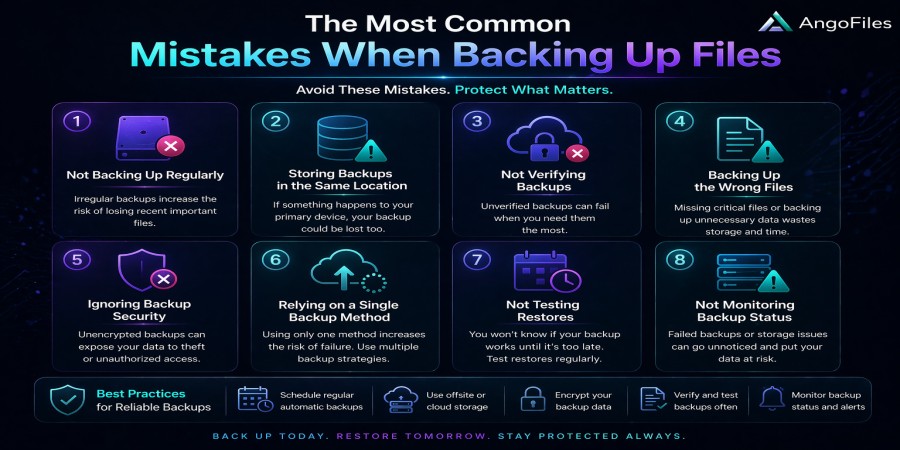
The Most Common Mistakes When Backing Up Files
Apr 21, 2026 06:12 PM
Leandro Neto
The Most Common Mistakes When Backing Up Files
Backing up files sounds simple, but in practice it is one of the most neglected parts of digital file management. Many people assume that once a file is copied somewhere else, it is safe forever. In reality, backups fail for the same reason data gets lost in the first place: bad planning, weak habits, and false confidence.
A backup is only useful if it is complete, current, accessible, and tested. If any of those elements are missing, the backup may give a false sense of security. That is why understanding the most common mistakes when backing up files is essential for individuals, businesses, and anyone who depends on digital data.
1. Not backing up at all
The biggest mistake is the simplest one: doing nothing.
Many users think their files are too small to matter, or they believe their device will never fail. Others postpone backups because they seem like an extra task with no immediate reward. That mindset is dangerous. Data loss can happen from hardware failure, accidental deletion, corruption, theft, malware, or human error.
A file that is not backed up is a file that can disappear permanently.
2. Keeping only one backup copy
Some people do make backups, but they store only one copy in one place. That is not enough.
A single backup can fail just like the original file. If the device becomes damaged, lost, corrupted, or inaccessible, the backup is gone too. A good backup strategy needs more than one copy, ideally stored in different locations or on different systems.
One copy is a mirror of risk, not a shield against it.
3. Backing up to the same device
Another common mistake is storing a backup on the same phone, laptop, or hard drive as the original file. This creates the illusion of safety without actual protection.
If the device fails, both the original file and the backup can be lost together. A true backup must exist separately from the source file. Otherwise, it is just another copy on the same vulnerable system.
4. Using outdated backups
A backup is only useful if it reflects your current data.
Many people create a backup once and then forget about it. Over time, they add new files, edit old files, or delete important documents from the original folder. The backup remains frozen in time, while the real data keeps changing.
When disaster strikes, they discover that the backup is missing their latest work. That is why backups must be updated regularly, not just created once.
5. Not testing the backup
One of the most dangerous mistakes is assuming a backup works without checking it.
A backup is not successful just because it exists. It must be readable, restorable, and complete. Files can become corrupted, software can fail, and folders can be misconfigured. If you never test recovery, you may only discover the problem when it is already too late.
A backup that cannot be restored is not a backup. It is a broken promise.
6. Ignoring file organization
Poor organization makes backups harder to manage and harder to trust.
When files are stored randomly, users may forget what has been backed up and what has not. Important documents can be missed, duplicate copies can create confusion, and restoration becomes slower and more stressful.
Good backup systems depend on clear file structure, consistent naming, and predictable storage habits. The easier it is to understand your files, the easier it is to protect them.
7. Backing up only once in a while
Some users believe backups only need to happen when they remember. That approach is too unreliable.
If files change often, backups must happen often enough to keep up. Otherwise, a crash or accidental deletion may erase days, weeks, or months of work. The more frequently your files change, the more often your backup should run.
Backup frequency should match how important and active the data is.
8. Relying on a single storage type
Every storage method has strengths and weaknesses. USB drives can be lost. External hard drives can fail. Cloud storage can be inaccessible if accounts are lost or services are unavailable. Relying on only one type of backup creates a single point of failure.
A stronger strategy combines different backup methods. For example, one local copy and one cloud copy can provide better protection than either alone. Diversity in storage is a form of resilience.
9. Forgetting to protect the backup itself
Many users protect their original files but leave their backups exposed.
That is a mistake because backups can be attacked, deleted, encrypted by ransomware, or altered by unauthorized users. A backup should be treated with the same level of care as the original file, and often even more.
Security measures like access control, encryption, and account protection matter just as much for backups as they do for active files.
10. Not checking what actually got backed up
Sometimes users assume that a backup process saved everything, when in fact it only saved part of the data.
This often happens when:
- a folder was excluded by mistake
- a sync tool skipped a file
- file permissions blocked access
- the backup software failed silently
If you do not verify the contents, you may believe your important data is protected when it is not. Reviewing backup contents is just as important as creating the backup itself.
11. Using confusing sync as if it were a backup
Sync and backup are not the same thing.
A syncing system copies changes between devices, but it can also replicate mistakes. If a file is deleted or corrupted on one device, that deletion may spread to all connected devices. A true backup is meant to preserve data, not just mirror current changes.
Many people confuse cloud sync with backup and lose data because of it. That is one of the most expensive misunderstandings in digital storage.
12. Not keeping older versions
File history matters.
Sometimes a file is not deleted, but it becomes corrupted or overwritten. If you only keep the latest version, you may lose the ability to return to a clean earlier copy. Versioned backups solve this problem by storing previous states of the same file.
This is especially useful for documents, creative work, and business data that change over time.
13. Waiting until after a problem happens
Many people start thinking about backups only after they lose data. By then, the damage is already done.
Backing up files is a preventive habit, not a recovery reaction. The best time to create a backup is before anything goes wrong. Once a file is lost, the backup strategy is no longer about protection. It becomes an emergency response.
14. Not backing up important file categories
Users often protect documents but forget about other valuable files such as:
- photos
- videos
- project files
- contacts
- application settings
- spreadsheets
- archives
- creative assets
In many cases, the “important” files are not the obvious ones. A complete backup strategy should cover everything that would be painful to lose, not just office documents.
15. Assuming cloud storage is automatically enough
Cloud storage is useful, but it is not a perfect safety net.
If a user loses account access, forgets credentials, or deletes files by accident, cloud storage alone may not be enough. Some services also have retention policies, account rules, or access limits. That is why cloud storage should be part of a wider backup strategy, not the entire strategy.
Convenience is not the same as long-term protection.
How to avoid these mistakes
A better backup strategy is simple in principle:
- Keep more than one copy
- Store backups in different places
- Update them regularly
- Test restoration
- Organize files clearly
- Protect backups with security measures
- Use both local and cloud storage when possible
The goal is not just to copy files. The goal is to make sure they can survive failure.
Conclusion
Most backup mistakes come from overconfidence, delay, or confusion. People assume they are safe because a copy exists somewhere, but real protection requires planning, verification, and consistency.
A backup is only valuable when it is current, separate, secure, and restorable. Anything less leaves your files exposed.
The safest approach is to treat backups as part of your daily digital routine, not as something to think about only after disaster strikes.
Protect Your Files with AngoFiles
With AngoFiles, you can store, organize, and share your files with a system built for reliability and control. Create a smarter file strategy, keep your data accessible, and reduce the risk of losing important content.
Start using AngoFiles today and make file protection part of your workflow.
Login or create account to leave comments
Popular articles

Optimizing Digital Work: How Cloud Storage, File Sharing, an...
Dec 14, 2025 04:08 PM

Upload and Share Your Files with Ango Files
Dec 14, 2025 03:45 PM

Best Secure Cloud Storage for Business in 2026
Jan 17, 2026 11:19 AM

Best Free Cloud Storage Services in 2026
Apr 03, 2026 07:01 AM

How to Send Large Files Over the Internet for Free (Complete...
Mar 30, 2026 05:19 PM
Categories
Comments (0)