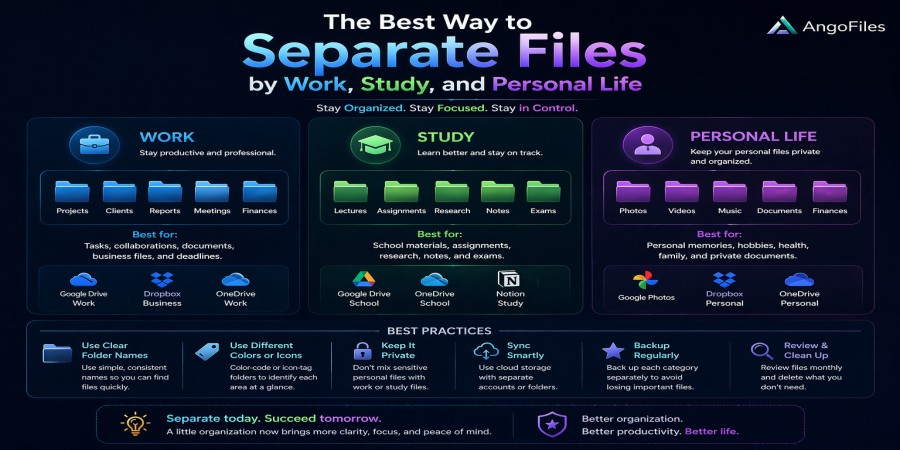
The Best Way to Separate Files by Work, Study, and Personal Life
Apr 21, 2026 06:18 PM
Leandro Neto
The Best Way to Separate Files by Work, Study, and Personal Life
One of the biggest problems in digital file management is not losing files, but mixing them. When work documents, school materials, and personal files all live in the same folders, everything becomes harder to find, harder to protect, and harder to manage.
At first, mixing files may not seem like a serious issue. But over time, it creates confusion, wastes time, increases the chance of mistakes, and makes it harder to keep your digital life under control. A clear separation between work, study, and personal files is not just about organization. It is about efficiency, focus, privacy, and long-term file management.
The best system is one that is simple enough to maintain, flexible enough to grow with you, and clear enough that you always know where each file belongs.
Why File Separation Matters
Files reflect different parts of your life. Work files often contain professional documents, reports, contracts, presentations, and client-related content. Study files may include notes, assignments, research, PDFs, and course materials. Personal files usually contain photos, videos, receipts, private documents, and other content you do not want mixed with professional data.
If all of these are stored together, three problems appear quickly.
First, you waste time searching. A file you need urgently may be buried under unrelated content. Second, you reduce focus. Seeing personal files while working, or work files while relaxing, can create mental clutter. Third, you increase risk. A mistaken deletion, shared link, or device loss can affect the wrong category of files.
A good separation system protects both productivity and privacy.
The Best Structure Starts with Three Main Categories
The simplest and most effective method is to create one main folder for each area of life:
Work
Study
Personal
This seems obvious, but the power of the system comes from consistency. Every file should have a clear home from the beginning. When a file is created or downloaded, it should be saved immediately in the correct category instead of being left in a temporary folder.
Inside each main category, create subfolders based on the type of content. For example:
Work can contain contracts, reports, meetings, invoices, clients, and drafts.
Study can contain courses, notes, assignments, research, and exam material.
Personal can contain photos, health records, travel, finance, and family documents.
This structure makes it easier to find files later without needing to remember where you left them.
Use Clear Naming Rules
Folder structure alone is not enough. File names also matter.
A well-named file should tell you what it is without needing to open it. That means avoiding random names like “final,” “new,” or “document1.” These names become useless very quickly, especially when you have many files of the same type.
A better naming pattern includes the category, subject, and date when needed. For example:
Work_Invoice_ClientName_2026
Study_English_Grammar_Notes
Personal_Travel_Receipts_March2026
This kind of naming makes searching much easier. It also helps you identify files immediately, even when they are stored in the wrong place by mistake.
The goal is not to make names long. The goal is to make them meaningful.
Keep Work Files Separate for Professional Control
Work files deserve their own space because they often have the highest level of responsibility attached to them. They may include confidential information, deadlines, client work, or business records. Mixing them with personal content creates avoidable risk.
A separate work folder helps you do three things better. It helps you find the right file quickly during busy hours. It helps you avoid accidental sharing of private content. And it helps you maintain a professional archive of your projects, which is useful when you need to review old work or send supporting documents later.
If you work with clients or teams, this separation becomes even more important. Different projects should have their own subfolders so that one client’s material does not get mixed with another’s.
Keep Study Files Structured by Subject or Semester
Study files are usually easier to manage when they are grouped by subject, course, or semester. The mistake many students make is saving everything in one “school” folder without any internal logic. That creates clutter very quickly.
A better approach is to divide study files into specific areas such as mathematics, language, history, science, or exam preparation. If you are in a course-based environment, organize them by semester or module.
This helps in several ways. It makes revision easier, because you can go directly to the subject you need. It also helps you track progress over time. When assignments, notes, and resources are properly arranged, studying becomes less stressful and more efficient.
If your studies involve both digital notes and scanned documents, keep them in separate subfolders so they do not get mixed together.
Keep Personal Files Private and Easy to Protect
Personal files are often the most sensitive, yet they are also the easiest to neglect. People tend to keep photos, financial records, IDs, and personal documents in the same random folder because they assume they will remember where everything is. That rarely works for long.
A personal folder should be divided by life area. For example, photos should not sit next to tax documents, and health records should not be mixed with vacation videos. Each type of personal file deserves its own place.
This separation is useful for privacy and safety. If you ever need to share one type of file, you are less likely to expose unrelated private data. It also helps when backing up or encrypting sensitive content, because you can give extra protection only to the files that need it most.
Use Different Storage Zones When Necessary
Not every file needs the same level of access. Some files are used daily, while others are only needed occasionally. A good file system reflects that difference.
You can create separate zones such as:
Active files for current work or study
Archive files for older but still important material
Private files for sensitive personal content
Shared files for documents you need to send or access often
This approach prevents your most important folders from becoming overcrowded. It also makes backups easier, because you can prioritize what matters most. For example, your active and private files may need frequent backup, while archive files can be stored differently.
Keep Temporary Files Out of Your Main System
A common reason file systems become messy is temporary clutter. Downloads, screenshots, random PDFs, duplicate copies, and unfinished drafts often end up in the wrong place. Over time, this destroys the clarity of the entire structure.
The best solution is to create a temporary folder for items that are not yet ready to be classified. Once a file is reviewed, move it into work, study, or personal as quickly as possible.
That small habit prevents a lot of confusion. It also keeps your main folders clean and reliable, which makes long-term organization much easier.
Back Up Each Category Separately
Not all files have the same importance, and not all backups should be treated the same way. Work, study, and personal files may need different backup priorities.
Work files might need regular backup because they change often and may be urgent. Study files may need version history because assignments and notes evolve over time. Personal files may need extra privacy protection because they often contain sensitive information.
Separating your files into categories makes backup management much easier. You can decide what to store locally, what to store in the cloud, and what should have extra copies. This keeps your system safe without making it complicated.
Digital Separation Also Helps Mental Separation
File organization is not only technical. It also affects how you think.
When your work files, study files, and personal files are clearly separated, your mind experiences less clutter. You know where to focus when it is time to work. You know where to study when it is time to learn. And you know where to relax when it is time for your personal life.
A messy file system often reflects a messy digital routine. A well-structured one supports better concentration and less stress. That is why organization is not just about storage. It is about creating mental order.
The Best System Is the One You Can Maintain
Some people overcomplicate file organization. They create dozens of folders, nested subfolders, and complicated naming conventions that work for a week and then collapse under their own weight.
The best system is simple enough to use every day. If it takes too long to decide where a file belongs, the system will fail. If it is easy to understand, you will keep using it.
A good rule is this: create enough structure to stay organized, but not so much that the system becomes annoying.
A Practical Example of a Clean File System
Here is a simple model:
Work
- Clients
- Contracts
- Reports
- Invoices
- Drafts
Study
- Courses
- Notes
- Assignments
- Research
- Exams
Personal
- Photos
- Finance
- Travel
- Health
- IDs
Temporary
- Downloads
- Screenshots
- To Sort
This kind of structure is easy to understand, easy to maintain, and easy to expand as your needs grow.
Conclusion
The best way to separate files by work, study, and personal life is to create a simple, consistent system with clear categories, meaningful folder names, and disciplined habits. Work files should stay professional and accessible. Study files should stay organized by subject or course. Personal files should stay private and protected.
When your files are properly separated, you save time, reduce mistakes, protect sensitive data, and make your digital life much easier to manage.
A clear file structure is not a luxury. It is one of the most practical habits you can build.
Keep Your Files Organized with AngoFiles
With AngoFiles, you can upload, organize, and manage your files in a way that makes separation simple and reliable. Keep work, study, and personal files in their proper place, create secure links when needed, and maintain full control over your digital storage.
Start using AngoFiles today and build a file system that works for your real life.
Login or create account to leave comments
Popular articles

Optimizing Digital Work: How Cloud Storage, File Sharing, an...
Dec 14, 2025 04:08 PM

Upload and Share Your Files with Ango Files
Dec 14, 2025 03:45 PM

Best Secure Cloud Storage for Business in 2026
Jan 17, 2026 11:19 AM

Best Free Cloud Storage Services in 2026
Apr 03, 2026 07:01 AM

How to Send Large Files Over the Internet for Free (Complete...
Mar 30, 2026 05:19 PM
Categories
Comments (0)