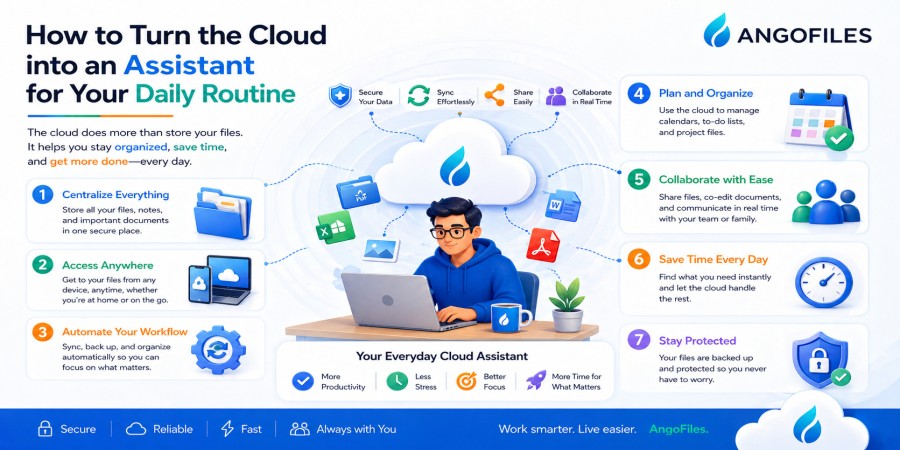
How to Turn the Cloud into an Assistant for Your Daily Routine
Apr 25, 2026 02:57 PM
Leandro Neto
How to Turn the Cloud into an Assistant for Your Daily Routine
For many people, the cloud is still seen as a place to store files. That definition is true, but incomplete. The cloud can do much more than keep documents safe. When used well, it can become a practical assistant that helps you manage time, reduce stress, stay organized, and move through your day with less friction.
The real value of cloud storage is not only access. It is support. It helps you find files faster, move between devices without delay, back up important information automatically, share content instantly, and keep your digital life structured. In other words, the cloud can become part of your routine in the same way a notebook, calendar, or planner does. The difference is that it works continuously in the background.
If you want to make your daily routine easier, the cloud is one of the most useful tools available.
The Cloud Is More Than a Storage Space
Most people treat the cloud as a remote folder. They upload files, forget about them, and only return when something is needed. That approach wastes much of the cloud’s potential.
A better way to think about cloud storage is as a support system. It can help you collect important files in one place, make them available anywhere, and reduce the time spent repeating simple tasks. Instead of searching through devices, messaging apps, downloads, and local folders, you can rely on one connected system.
That shift changes the way you work and live. The cloud stops being passive and becomes active. It starts helping you instead of just holding data.
1. Use the Cloud as Your Main Memory for Important Files
One of the easiest ways to make the cloud useful in daily life is to treat it as a central memory bank for important files. Instead of leaving documents scattered across your phone, laptop, email, and USB drives, store them in one organized cloud space.
This saves time because you no longer need to remember where each file was last saved. It also reduces the risk of losing something important. If your device fails or becomes unavailable, your files are still accessible from another device.
This is especially useful for documents you may need quickly, such as IDs, receipts, contracts, school materials, travel details, or project files. When your cloud is organized well, it becomes a reliable extension of your memory.
2. Let the Cloud Follow You Between Devices
Daily routines are rarely tied to one device. You may begin a task on your phone, continue it on your laptop, and finish it later on a desktop. Without cloud storage, that process usually requires sending files to yourself, using cables, or copying data manually.
The cloud removes that friction. Once a file is uploaded, it can be accessed wherever you sign in. That means you can move from one device to another without interrupting your routine or wasting time transferring files again and again.
This is one of the strongest ways the cloud acts like an assistant. It adapts to your day instead of forcing your day to adapt to your device.
3. Use the Cloud to Simplify Morning and Evening Routines
A well-organized cloud can fit naturally into the beginning and end of your day.
In the morning, you can check notes, plans, calendars, documents, or work materials stored in the cloud before you start. At the end of the day, you can upload completed files, save new notes, and back up anything important before switching off.
This creates a simple routine:
- review what matters
- save what you used
- prepare what you need for tomorrow
The cloud becomes part of your daily rhythm. Instead of being a tool you only remember when a file is missing, it becomes a consistent step in how you manage your time.
4. Make File Sharing Faster and Easier
A major advantage of cloud storage is how quickly it lets you share files. Instead of attaching large files to emails or sending repeated copies through different apps, you can upload once and share a link.
That saves time in many situations:
- sending work documents
- sharing school assignments
- sending photos or videos
- giving access to team files
- distributing resources to clients or students
The cloud reduces the number of steps between “I have the file” and “someone else can use it.” That efficiency is exactly what an assistant should do.
5. Let the Cloud Protect Your Routine from Mistakes
Everyone forgets things. Files get deleted, phones are lost, folders get misplaced, and devices stop working. When that happens, the cloud can prevent a small mistake from becoming a major problem.
If your important files are already stored online, you do not need to panic when your device has an issue. You can recover what you need quickly instead of rebuilding everything from zero.
This is one of the quietest but most valuable ways the cloud helps. It reduces the mental pressure of “What if I lose this?” When your files are backed up and accessible, your routine becomes more stable.
6. Use the Cloud to Reduce Repetition
Many daily tasks become repetitive because files are not well managed. You may download the same document multiple times, send the same file to yourself, or search for the same material again and again.
The cloud reduces this repetition by keeping everything in one place. Once a file is stored, you can reuse it whenever needed. If you keep templates, notes, forms, or recurring documents in the cloud, you do not need to rebuild the same materials every time.
This creates a smoother routine and saves energy. Less repetition means less friction, and less friction means more time for actual work.
7. Turn the Cloud into a Personal Organizer
The cloud becomes even more useful when you use it for more than files. You can also store routine-related materials that help you stay organized, such as:
- checklists
- schedules
- travel documents
- bills
- study notes
- project outlines
- scanned records
By keeping these items online, you create one organized place that supports different parts of your life. Instead of searching across apps and devices, you can check one system and move on with your day.
A cloud system like this works like a digital assistant because it keeps your routine visible and accessible.
8. Use the Cloud to Stay Ready for Unexpected Situations
Life is not always predictable. You may need a document urgently, switch devices suddenly, or travel without your usual equipment. In those moments, cloud storage becomes extremely useful.
If your files are already online, you can adapt quickly. You do not need to wait until you return home or find a specific device. You can continue your routine from wherever you are.
This flexibility is one of the cloud’s most practical strengths. It gives you continuity, which is exactly what a good assistant should provide.
9. Combine Cloud Storage with Daily Habits
The cloud works best when paired with simple habits. For example:
- upload important files immediately
- use clear folder names
- delete or archive what you no longer need
- keep a backup habit
- review your cloud space regularly
These habits turn the cloud from a passive storage area into an active support system. The more consistent your routine becomes, the more useful the cloud feels.
A tool only helps when it is used well. A well-organized cloud can transform daily life because it removes clutter and gives structure to your workflow.
10. Why This Matters for Productivity
Productivity is not only about doing more. It is about reducing wasted effort. The cloud helps with that by making access, sharing, backup, and organization faster.
When your cloud is set up properly:
- you spend less time searching
- you spend less time repeating tasks
- you spend less time worrying about file loss
- you spend less time moving between systems
That means more time for the things that actually matter. A good cloud routine does not just improve storage. It improves the whole experience of working and living digitally.
Conclusion
The cloud can become a powerful assistant in your daily routine when you stop seeing it as just storage and start using it as a support system. It can help you stay organized, move faster between devices, share files more easily, protect important information, and reduce the small frustrations that slow down everyday life.
The goal is not simply to store files online. The goal is to build a digital routine that works for you, quietly and consistently, in the background.
Make the Cloud Work for You with AngoFiles
With AngoFiles, you can turn cloud storage into a practical part of your daily routine. Upload your files, keep them organized, access them anywhere, and manage your digital life with less stress and more control.
Start using AngoFiles today and make the cloud a real assistant in your everyday workflow.
Login or create account to leave comments
Popular articles

Optimizing Digital Work: How Cloud Storage, File Sharing, an...
Dec 14, 2025 04:08 PM

Upload and Share Your Files with Ango Files
Dec 14, 2025 03:45 PM

Best Secure Cloud Storage for Business in 2026
Jan 17, 2026 11:19 AM

Best Free Cloud Storage Services in 2026
Apr 03, 2026 07:01 AM

How to Send Large Files Over the Internet for Free (Complete...
Mar 30, 2026 05:19 PM
Categories
Comments (0)