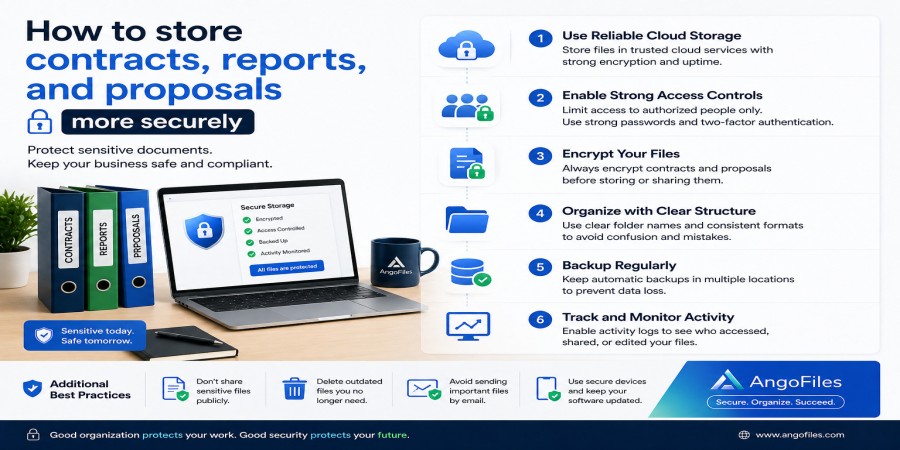
How to Store Contracts, Reports, and Proposals More Securely
Apr 25, 2026 03:16 PM
Leandro Neto
How to Store Contracts, Reports, and Proposals More Securely
Contracts, reports, and proposals are not ordinary files. They often contain sensitive business information, financial details, strategic plans, client data, and internal decisions that should not be exposed, lost, or altered. When these documents are stored carelessly, the risk is not only organizational confusion. The risk is legal, financial, and reputational damage.
Secure storage is therefore not just a technical preference. It is part of responsible document management. A secure system protects the confidentiality of the file, preserves its integrity, and ensures that authorized people can access it when needed. The goal is not simply to keep documents somewhere. The goal is to keep them safe, organized, and under control.
Why These Documents Need Extra Protection
Contracts, reports, and proposals are valuable because they influence decisions. A contract may define obligations and rights. A report may contain sensitive data or performance insights. A proposal may reveal pricing, strategy, or future plans. If any of these files are exposed or changed by mistake, the consequences can be serious.
That is why these documents should never be treated like casual downloads or temporary notes. They should be handled with a higher standard of care than ordinary files. A secure storage approach reduces the chance of unauthorized access, accidental deletion, version confusion, and file corruption.
1. Store Them in a Dedicated Folder Structure
The first step in secure storage is separation. Contracts, reports, and proposals should not be mixed with random personal files, downloaded attachments, or temporary drafts. A dedicated folder structure makes it easier to control access and easier to find the correct document later.
A practical structure might look like this:
Contracts
Reports
Proposals
Drafts
Archived Documents
Inside each main folder, you can create subfolders by client, project, month, or year. This gives you control without making the system too complicated.
Clear structure matters because a file that is easy to find is also easier to protect. When documents are scattered, people make mistakes. When they are organized, security becomes easier to maintain.
2. Use Clear Naming Rules for Every File
Secure storage is not only about where a file is kept. It is also about how it is identified.
A weak file name makes it harder to track the correct version and easier to confuse one document with another. That is risky when the file is a contract or proposal. A strong naming rule should include enough detail to make the document instantly recognizable.
For example:
ClientName_Contract_2026
ProjectName_Proposal_V1
Monthly_Report_Sales_2026-04
This kind of naming reduces confusion, helps with search, and makes document management more reliable. It also makes it easier to see which file is current and which one is outdated.
3. Restrict Access Only to the People Who Need It
One of the most important parts of secure storage is access control. Not everyone needs to see every file.
Contracts may need to be visible only to management, legal staff, or the client responsible for approving them. Reports may need to be limited to specific teams. Proposals may need to be shared only with decision-makers or collaborators.
The fewer people who have access, the lower the risk of accidental leakage or unauthorized use. This does not mean making files hard to reach for the right people. It means making them unavailable to the wrong people.
A secure system always balances accessibility with control.
4. Use Strong Authentication
Even the best file structure becomes unsafe if account access is weak. If someone can easily enter your storage account, your documents are not truly protected.
A secure document system should use strong passwords and additional account protection whenever possible. This reduces the chance of unauthorized access, especially if a device is lost, shared, or compromised.
For business documents, account protection should never be optional. A secure file is only as safe as the account that protects it.
5. Keep Drafts and Final Versions Separate
Contracts, reports, and proposals often go through multiple changes. That is normal. The problem starts when drafts and final versions are stored together without clear distinction.
If old versions remain mixed with final copies, someone may open the wrong document, send the wrong file, or act on outdated information. In a secure storage system, drafts should be clearly labeled and separated from final documents.
A simple practice is to mark drafts and finals differently, such as:
Proposal_ClientName_Draft
Proposal_ClientName_Final
Contract_ClientName_Signed
That reduces error and keeps the record clear.
6. Back Up Important Documents Regularly
Security is not only about preventing access. It is also about protecting against loss. A file can be deleted, damaged, overwritten, or lost because of device failure. That is why backups are essential.
A secure backup strategy should include copies stored in more than one place. That way, if one copy is lost, another remains available. For important documents, a backup is not a bonus. It is part of basic protection.
Backups are especially important for contracts and proposals because recreating them later can be difficult or impossible. A proper backup system preserves both the document and the work behind it.
7. Avoid Storing Sensitive Files in Unprotected Locations
Some people keep important documents in downloads folders, desktop shortcuts, chat apps, or random email attachments. That is a weak storage habit.
Those locations are convenient, but not secure enough for sensitive business documents. A contract saved in the wrong place can be accidentally deleted, shared, or overlooked. A proposal buried in a messaging app may be difficult to retrieve later. A report stored on a single device may disappear if that device fails.
Sensitive files should live in a system designed for controlled access and long-term organization, not in temporary spaces.
8. Use Encryption When Available
Encryption adds another layer of protection by making documents harder to read without authorization. Even if someone gains access to a storage system, encrypted files are much harder to misuse.
This is especially useful for contracts, reports with confidential data, and proposals that contain pricing or strategy information. Encryption does not replace access control, but it strengthens it.
A secure storage system should always think in layers. The more important the document, the more protection it should have.
9. Track Version History
Documents often change, and sometimes a later version is not better than an earlier one. That is why version history matters.
If a proposal is updated, or a report is revised, or a contract draft is edited, you should still know what changed and when. This helps prevent confusion and allows you to return to a previous version if needed.
Version control is especially important in business environments where multiple people may work on the same file. Without it, people can lose track of which file is current and which one should be ignored.
10. Archive Old Documents Instead of Leaving Them Everywhere
Not every document needs to stay in active use forever. Once a contract is completed, or a report has served its purpose, or a proposal has been rejected, it should be moved into an archive folder.
Archiving helps keep active folders clean and reduces the risk of accidental editing or deletion. It also makes your storage system easier to navigate.
An archive is not a dumping ground. It is a controlled space for documents that are no longer active but still need to be kept safely.
11. Share Documents Through Secure Links
When documents need to be sent to others, secure links are better than uncontrolled attachments. A secure link reduces the number of copies floating around and gives you more control over access.
This is especially useful for proposals and contracts, which may be shared with clients, legal teams, or internal stakeholders. A link-based approach is easier to manage than sending the same file over and over again in different formats.
The fewer uncontrolled copies you create, the more secure your file remains.
12. Review Your Storage System Regularly
A secure document system is not something you build once and forget. It needs regular review.
Over time, folders become crowded, permissions change, versions multiply, and old files accumulate. If you do not review the system, it slowly becomes less secure and less useful.
A simple monthly or quarterly review can help you:
- remove duplicates
- archive old files
- check access permissions
- confirm that backups are working
- ensure that final versions are correctly labeled
Regular review is one of the easiest ways to keep storage secure without making it complicated.
The Best Secure Storage Habit Is Consistency
The strongest system in the world will fail if people do not use it consistently. Security is not only about tools. It is about habits.
If everyone on a team stores files differently, names files differently, or shares files randomly, the system will become weak very quickly. But if the habits are clear and repeated, secure storage becomes natural.
The goal is to make safety part of the workflow, not an extra step people forget.
Conclusion
Contracts, reports, and proposals should be stored securely because they contain information that matters. A good secure storage system separates these documents from other files, controls access, uses clear naming, supports backups, tracks versions, and reduces the risk of loss or misuse.
Security works best when it is simple, structured, and consistent. The more organized your storage system is, the easier it becomes to protect your most important documents.
Store Sensitive Documents with Confidence
With AngoFiles, you can store, organize, and manage contracts, reports, and proposals in a way that supports both security and control. Keep important files in the right place, share them carefully, and maintain a cleaner document workflow.
Start using AngoFiles today and build a safer system for your most important files.
Login or create account to leave comments
Popular articles

Optimizing Digital Work: How Cloud Storage, File Sharing, an...
Dec 14, 2025 04:08 PM

Upload and Share Your Files with Ango Files
Dec 14, 2025 03:45 PM

Best Secure Cloud Storage for Business in 2026
Jan 17, 2026 11:19 AM

Best Free Cloud Storage Services in 2026
Apr 03, 2026 07:01 AM

How to Send Large Files Over the Internet for Free (Complete...
Mar 30, 2026 05:19 PM
Categories
Comments (0)