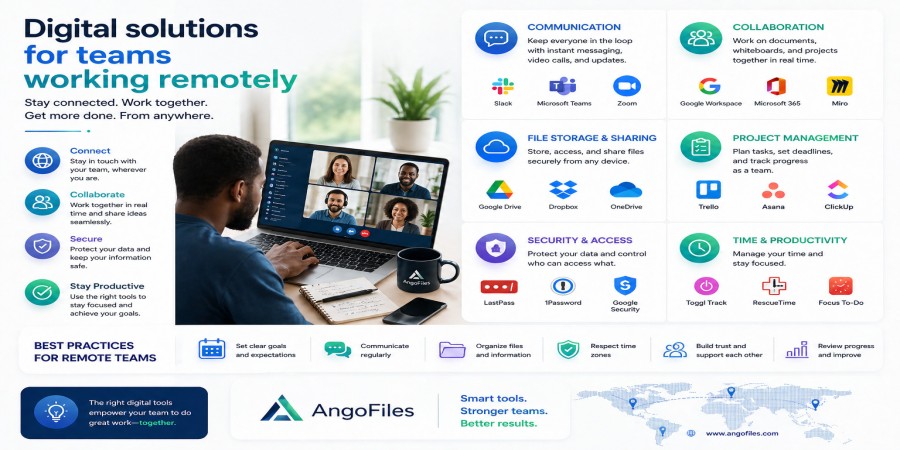
Digital Solutions for Teams Working Remotely
Apr 25, 2026 03:21 PM
Leandro Neto
Digital Solutions for Teams Working Remotely
Remote work has changed the way teams operate. What used to depend on a shared office, physical meetings, and paper documents now depends on digital tools, online communication, and systems that can keep everyone connected from different locations. For remote teams, success is no longer only about talent or effort. It is about having the right digital solutions in place.
A team that works remotely needs more than messaging apps and video calls. It needs a structure that supports communication, file sharing, task management, collaboration, security, and accountability. Without that structure, remote work quickly becomes confusing. Files get lost, updates are missed, responsibilities overlap, and productivity drops.
The best digital solutions are the ones that reduce friction. They make it easier for teams to communicate clearly, access documents quickly, collaborate without confusion, and stay organized even when no one is in the same place. In that sense, the right digital setup does more than support remote work. It makes remote work actually work.
Why Remote Teams Need Better Digital Systems
Remote teams face challenges that office-based teams do not always experience. There is no desk next to a colleague to clarify something quickly. There is no shared filing cabinet. There is no in-person supervision to keep everyone aligned. Every task depends more heavily on digital structure.
That means the tools a remote team uses are not optional extras. They are part of the work itself. If communication is weak, the team slows down. If file management is messy, people waste time searching for documents. If tasks are not tracked, work gets duplicated or forgotten. If security is poor, important data becomes vulnerable.
A strong digital system solves these problems before they grow. It creates a working environment where distance does not become disorganization.
1. Cloud Storage for Centralized Access
One of the most important digital solutions for remote teams is cloud storage. Remote work depends on file access, and cloud storage gives the team one central place to keep documents, media, reports, and shared resources.
Instead of storing files on a single computer or sending attachments back and forth, cloud storage allows team members to access the same files from different devices and locations. That means less confusion, fewer duplicate copies, and faster access to what the team needs.
For remote teams, this is especially valuable because no one should have to depend on one person’s laptop to get important work done. A centralized file system keeps the team moving even when people are separated by distance.
2. Secure File Sharing
Remote teams share a lot of information: contracts, presentations, reports, proposals, images, spreadsheets, and updates. If this sharing happens through random chat messages or unstructured email chains, it becomes hard to control and easy to lose track of.
Secure file sharing gives the team a better way to distribute documents. Instead of sending repeated copies, the team can use controlled access or shareable links. That reduces clutter and makes it easier to manage who can view, edit, or download a file.
This is important not only for efficiency, but also for security. Remote teams often handle sensitive material, and secure sharing helps reduce the risk of exposing the wrong file to the wrong person.
3. Task Management Tools
A remote team needs to know who is doing what, when it is due, and what has already been completed. Task management tools solve this by turning work into visible steps instead of private assumptions.
When tasks are clearly assigned and tracked, the team avoids confusion. People know what they are responsible for. Managers can see progress. Deadlines are easier to monitor. Nothing depends only on memory.
This is one of the most important digital solutions for remote teams because distance makes informal coordination harder. A good task system replaces guesswork with clarity.
4. Communication Platforms
Communication is the core of remote collaboration. Teams need a way to talk quickly, exchange ideas, resolve problems, and keep everyone informed. That is why messaging platforms, group chats, and team communication tools are essential.
But communication tools should not create noise. The best systems help teams stay in touch without overwhelming them with unnecessary messages. Clear channels, organized discussions, and consistent updates make communication more useful.
A remote team works better when communication is structured, not chaotic. The right platform helps people ask questions, share progress, and make decisions without losing focus.
5. Video Meetings for Alignment
Written communication is useful, but some things still work better face to face, even if the face is on a screen. Video meetings help remote teams align on goals, solve complex issues, and strengthen working relationships.
These meetings should not replace every form of communication. They should be used strategically. A short meeting can prevent long misunderstandings. It can also help the team stay connected as people, not just as names in a chat.
For remote teams, video meetings are most valuable when they are focused, planned, and used to move work forward instead of filling time.
6. Document Collaboration Tools
Remote teams often work on shared documents, reports, and presentations. Collaboration tools make this process smoother by allowing multiple people to contribute without constantly exchanging file versions.
This matters because version confusion is one of the biggest problems in remote work. When people are editing different copies of the same file, mistakes become more likely. Shared document tools reduce that problem by keeping everyone on the same page.
Collaboration becomes faster and safer when the team works in one controlled environment instead of several disconnected copies.
7. Security and Access Control
Remote work expands access, but it also increases risk. If people are working from different places and devices, the team needs stronger digital protection. That means secure logins, controlled permissions, and safe file storage.
Not every team member needs access to every file. Good access control limits exposure and helps protect sensitive information. It also makes it easier to manage responsibilities, because each person only sees the content relevant to their role.
Security is not only about preventing attacks. It is also about keeping the right structure around the team’s work.
8. Backup Systems
Remote teams depend on digital information every day. If a file is deleted, corrupted, or lost, the team may lose time, money, or momentum. That is why backup systems are essential.
A good backup system protects the team from accidental loss and makes recovery easier. It also gives people confidence to work without fear that one mistake will destroy everything.
Backups are especially important in remote settings because there is no central office to recover from digital problems manually. The system itself must be ready to protect the work.
9. Searchable File Organization
A remote team cannot afford to waste time looking for files. The larger the team grows, the more important it becomes to have a clear and searchable file structure.
Files should be grouped by project, client, department, or purpose. Naming should be consistent. Archive folders should be separate from active work. The easier a file is to find, the faster the team can work.
Searchable organization is one of the most underrated digital solutions because it turns a large pile of documents into a usable system.
10. Productivity Dashboards
Some remote teams also benefit from dashboards that bring everything together. A good dashboard can show tasks, progress, deadlines, files, and team activity in one place.
This does not replace communication or file storage. It supports them by giving the team a single view of what is happening. That helps reduce confusion and improves decision-making.
For managers and team members alike, visibility is one of the keys to staying organized remotely.
Why These Solutions Matter Together
No single digital tool solves remote work by itself. A team can have cloud storage but still be disorganized. It can have chat tools but no file control. It can have tasks assigned but no backup system. The real strength comes from combining the right tools into one working structure.
That structure should help the team:
- communicate clearly
- access files easily
- manage tasks visibly
- protect sensitive information
- avoid unnecessary repetition
- stay productive across locations
When these pieces work together, remote work becomes much more stable and much less stressful.
The Best Remote Teams Build Systems, Not Just Habits
Digital solutions are powerful, but they work best when they are part of a system. A remote team should not depend on memory or individual preference alone. It should have clear processes for sharing files, tracking tasks, organizing documents, and handling communication.
Systems create consistency. Consistency creates efficiency. Efficiency creates growth.
That is why the strongest remote teams are not just using tools. They are using those tools in a deliberate and repeatable way.
Conclusion
Remote teams need digital solutions that make distance easier to manage. Cloud storage, secure file sharing, communication platforms, task tools, backups, access control, and searchable organization all help create a smoother workflow. Together, they reduce confusion, protect important information, and allow teams to work more effectively from anywhere.
The goal is not simply to work online. The goal is to work well online.
Support Remote Team Work with AngoFiles
With AngoFiles, remote teams can store, organize, and share files in a way that supports real collaboration. Keep your documents accessible, your workflow clean, and your team aligned no matter where people are working from.
Start using AngoFiles today and make remote teamwork simpler, faster, and more reliable.
Login or create account to leave comments
Popular articles

Optimizing Digital Work: How Cloud Storage, File Sharing, an...
Dec 14, 2025 04:08 PM

Upload and Share Your Files with Ango Files
Dec 14, 2025 03:45 PM

Best Secure Cloud Storage for Business in 2026
Jan 17, 2026 11:19 AM

Best Free Cloud Storage Services in 2026
Apr 03, 2026 07:01 AM

How to Send Large Files Over the Internet for Free (Complete...
Mar 30, 2026 05:19 PM
Categories
Comments (0)