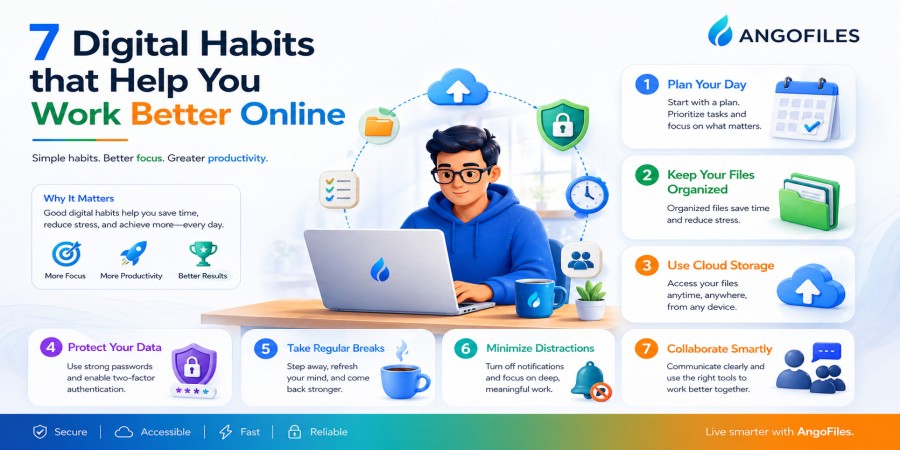
7 Digital Habits That Help You Work Better Online
Apr 25, 2026 02:52 PM
Leandro Neto
7 Digital Habits That Help You Work Better Online
Working online gives you speed, flexibility, and access to more tools than ever before. But it also creates a new problem: digital overload. Disorganized files, constant notifications, poor focus, and scattered workflows can make online work feel more stressful than productive.
The difference between average online work and effective online work is often not talent. It is habit.
Small digital habits, repeated every day, can completely change how well you work. They help you stay organized, reduce wasted time, protect your files, and make your digital routine more efficient. If you work online in any serious way, these habits are not optional. They are part of building a system that supports your goals instead of slowing you down.
1. Organize Your Files Before They Become a Problem
One of the fastest ways to lose time online is to let your files become messy. When documents, images, downloads, and project files are scattered everywhere, you waste energy searching instead of working.
A better habit is to organize files as soon as you create or receive them. Use clear folder structures, simple file names, and separate spaces for different parts of your life or work. A clean system means you can find what you need quickly, avoid duplicates, and reduce mistakes.
Good file organization is not just about neatness. It improves speed, focus, and confidence. When your digital space is under control, your work becomes easier to manage.
2. Back Up Important Files Regularly
Many people only think about backups after losing a file. By then, the damage is already done. A stronger habit is to back up important files before anything goes wrong.
This matters because online work depends heavily on digital documents, and digital documents can disappear through deletion, device failure, corruption, or account problems. A backup protects your time by preventing you from having to rebuild lost work.
The best approach is to keep more than one copy of critical files and update those copies regularly. That way, if one system fails, your work is still safe somewhere else.
3. Check Notifications Instead of Letting Them Control You
Notifications are one of the biggest distractions in online work. Every alert feels urgent, but most of them are not. If you respond to every message instantly, you lose concentration and spend your day reacting instead of producing.
A better habit is to check notifications at specific times instead of constantly interrupting your work. This gives you more control over your attention and helps you stay focused on one task at a time.
Digital work improves when attention is managed intentionally. The less you let random alerts control your day, the better your output becomes.
4. Use One Clear System for Saving and Sharing Work
Working online becomes much easier when you have a predictable system. If every file is saved differently, shared differently, or stored in different places, you create unnecessary friction.
A better habit is to use one clear method for saving, naming, and sharing files. For example, always save completed work in the same folder structure and always share files through the same platform or process.
This reduces confusion, speeds up collaboration, and makes it easier to remember where things are. Consistency is one of the most underrated productivity tools online.
5. Keep Your Workspace and Devices Clean
Digital clutter creates mental clutter. Too many open tabs, too many desktop icons, too many unnecessary apps, and too many disorganized downloads all make it harder to think clearly.
A useful habit is to clean your digital workspace regularly. Close tabs you no longer need, remove old files from the desktop, uninstall apps you do not use, and keep only the tools that actually help you work.
The cleaner your devices are, the easier it becomes to stay focused. A simple digital environment supports better decisions and less stress.
6. Protect Your Account and Data
Working better online is not only about speed. It is also about safety. If you lose access to your account, device, or files, your productivity drops immediately.
That is why protecting your digital life should become a daily habit. Use strong passwords, enable extra security where possible, and be careful with unfamiliar links or downloads. Keep your most important files stored in reliable places and avoid depending on memory alone.
Security may not feel urgent every day, but when something goes wrong, it becomes one of the most important habits you have. A protected digital system saves time, prevents loss, and keeps your work moving.
7. Review and Improve Your Workflow Often
A digital habit is only useful if it continues to work for you. What helped you six months ago may not be enough today. As your work grows, your system needs to grow with it.
That is why it helps to review your workflow regularly. Ask yourself what is slowing you down, where you lose time, which tools you use often, and which habits create unnecessary friction. Small improvements made consistently can have a huge effect over time.
The best online workers are not just busy. They are adaptable. They keep improving the way they work so that their systems become more efficient, not more complicated.
Why These Habits Matter
These seven habits work because they solve the most common problems in online work: confusion, distraction, lost files, wasted time, and poor organization. None of them are complicated on their own, but together they create a stronger digital routine.
When your files are organized, your backups are current, your notifications are under control, your workspace is clean, your data is protected, and your workflow keeps improving, you work with more clarity and less effort.
That is the real advantage of good digital habits. They make work feel lighter while helping you produce better results.
Conclusion
Working better online is not about doing everything faster. It is about building habits that reduce friction and support focus. The more consistent your digital habits are, the easier it becomes to stay productive, protect your files, and manage your time well.
In a digital world full of distractions, structure is power. The right habits turn your devices from sources of chaos into tools that actually help you move forward.
Work Smarter with AngoFiles
With AngoFiles, you can store, organize, and share your files in a way that supports better digital habits. Keep your work in order, access files quickly, and manage your online workflow with more control and less stress.
Start using AngoFiles today and build a smarter way to work online.
Login or create account to leave comments
Popular articles

Optimizing Digital Work: How Cloud Storage, File Sharing, an...
Dec 14, 2025 04:08 PM

Upload and Share Your Files with Ango Files
Dec 14, 2025 03:45 PM

Best Secure Cloud Storage for Business in 2026
Jan 17, 2026 11:19 AM

Best Free Cloud Storage Services in 2026
Apr 03, 2026 07:01 AM

How to Send Large Files Over the Internet for Free (Complete...
Mar 30, 2026 05:19 PM
Categories
Comments (0)